What is a battery back-up unit (BBU)?
Written by KCOM Support on 13/01/2026. Posted in Phone.
-
What is a Battery Back-Up Unit (BBU)?
A Battery Back-Up Unit allows your KCOM landline service to continue working for a limited time during a power cut.
If provided, the BBU powers your fibre equipment so you can still make and receive essential calls, including calls to the emergency services.
What does a BBU do?
-
Provides around 1 hour 20 minutes of standby power
-
Allows approximately 1 hour 20 minutes of talk time
-
Enables calls to:
-
-
Emergency services
-
-
-
Carers or doctors
-
-
-
Family, friends, or neighbours
-
During a power cut, we recommend limiting calls to essential use only.
Important things to know
Power and setup
-
The BBU must be plugged into a mains socket and always switched on to stay charged
-
The BBU powers your fibre box, not your phone handset
Phone compatibility
-
You must use a corded phone that does not rely on mains power
-
Cordless phones will not work during a power cut, even with a BBU
-
This is because cordless handsets need their own power supply, which the BBU does not provide
Looking after your BBU
-
The batteries should be checked once a year
-
You are responsible for:
-
-
Keeping the batteries charged
-
-
-
Replacing them when required
-
Support for customers who rely on their landline
If we have provided a BBU because:
-
You rely on your landline to contact the emergency services, or
-
You have equipment such as a lifeline or care alarm connected
We will:
-
Maintain the BBU for you
-
Contact you every 12 months to arrange a free engineer visit
-
Replace the batteries if needed
The visit takes no more than 15 minutes and is free of charge.
If you notice any issues with your BBU, contact us immediately:
-
Call 151 from your landline, or
-
01482 602151 from your mobile
-
What do the lights on the battery back-up unit mean?
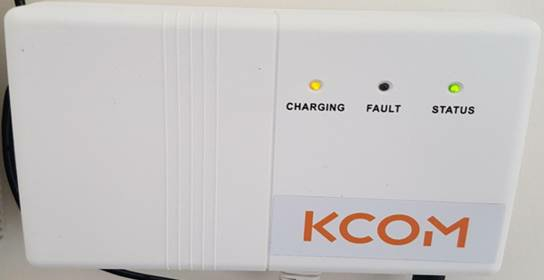
| Battery- LED Name | Colour | Meaning |
|---|---|---|
| Status | Green | Mains power is on |
| Off | Mains power is off | |
| Fault | Red | Replace battery |
| Off | Unit working correctly | |
| Charging | Yellow | Charging |
| Off | Battery working correctly |
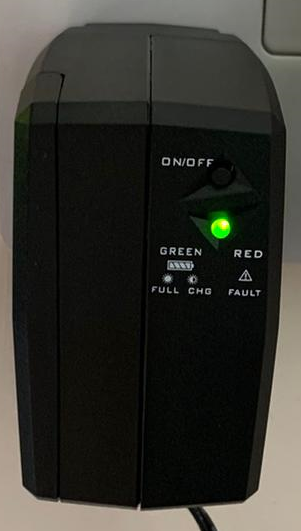
| Battery - LED name | Colour | Meaning |
|---|---|---|
| Top light | On | Mains power is on |
| Off | Mains power is off | |
| Bottom Light | Green | Battery charging |
| Red | Fault - Contact KCOM |
 Something to note
Need more help?
If you are unsure how power cuts affect your service, or if you have additional needs or accessibility requirements, we’re here to help.
Speak to your engineer or contact us on:
-
151 from your landline
-
01482 602151 from your mobile
Was this article useful?